Quick start
Two ways to get your LLM calls flowing through Spanlens and showing up in your dashboard. If your code already calls OpenAI, Anthropic, or Gemini directly, the CLI wires everything up in one command. Otherwise the manual path takes four steps.
One command setup for existing code (CLI)
If your codebase already has direct calls like new OpenAI({ apiKey: ... }), the CLI rewrites them in place in one pass. Run it from your app root:
npx @spanlens/cli@latest initBefore you run it, set up three things at /projects: a project, a Spanlens key (+ New Spanlens key, the sl_live_… value is shown once, so save it), and at least one provider key registered under that Spanlens key. The wizard prompts you to paste the Spanlens key and automates the rest.
Here is exactly what it does to your project:
- Detects your framework (Next.js for now)
- Validates your Spanlens key against the API and lists which providers you have keys registered for
- Writes
SPANLENS_API_KEYto.env.local(asks before overwriting an existing value) - Installs
@spanlens/sdkwith your package manager - Patches every
new OpenAI(...)/new Anthropic(...)/new GoogleGenerativeAI(...)call to the matchingcreateXxx()helper, only for providers you have keys for - Runs
tsc --noEmitto verify the patch compiles
Want to see the changes before anything is written? Run npx @spanlens/cli init --dry-run. Self-hosting? Add --server-url https://spanlens.yourcompany.com to point the wizard at your own instance instead of spanlens.io.
Then deploy:
- Add
SPANLENS_API_KEYto your production env (Vercel / Railway / Fly) - Redeploy, because new env values don't apply to existing deployments
When does the CLI need to run again?
Almost never. Once a file is patched it stays patched. Rotating, adding, or deactivating provider keys in the dashboard doesn't require a re-run. The only time you re-run is when:
- You add a new provider type(e.g. you had OpenAI before, now you're adding Anthropic) and your codebase still has direct
new Anthropic(...)calls. Otherwise just write the helper directly using the snippet from the manual path below.
Manual setup in four steps
Starting from scratch, or your code doesn't call a provider directly yet? Four steps, never run the CLI.
Step 1: Create your keys at /projects
- Sign up and create a project at /projects.
- Click + New Spanlens key on the project card. You'll get a
sl_live_…value shown once, so save it now. - Click + Add provider key next to the Spanlens key and paste your real OpenAI / Anthropic / Gemini key.
One Spanlens key covers every provider key you register under it. You don't need separate keys per provider.
Step 2: Add the env variable
Put the sl_live_… value you saved in Step 1 into your env file:
# .env.local
SPANLENS_API_KEY=sl_live_xxxxxxxxxxxxxxxxxxxxxxxxxxxxxxxxxxxxxx
Step 3: Install the SDK
pnpm add @spanlens/sdk
# or: npm install @spanlens/sdk
# or: yarn add @spanlens/sdk
Step 4: Use the helper for each provider you registered
Each helper is a drop-in replacement for the provider's normal client: same methods, same return types. SPANLENS_API_KEY is read automatically.
OpenAI
import { createOpenAI } from '@spanlens/sdk/openai'

const openai = createOpenAI()

const res = await openai.chat.completions.create({
  model: 'gpt-4o-mini',
  messages: [{ role: 'user', content: 'Hi' }],
})
Anthropic
import { createAnthropic } from '@spanlens/sdk/anthropic'

const anthropic = createAnthropic()

const msg = await anthropic.messages.create({
  model: 'claude-haiku-4-5',
  max_tokens: 1024,
  messages: [{ role: 'user', content: 'Hi' }],
})
Gemini
import { createGemini } from '@spanlens/sdk/gemini'

const genAI = createGemini()
const model = genAI.getGenerativeModel({ model: 'gemini-2.5-flash' })
const result = await model.generateContent('Hi')Using LangChain, LangGraph, Vercel AI SDK, or LlamaIndex?
Skip the per-provider helpers above and use a single callback handler instead. It captures LLM, chain, tool, and retriever spans automatically (including the full LangGraph node topology). See framework integrations for the per-framework snippet.
Adding new providers later (no CLI needed)
Once Steps 2 and 3 are done (env variable set, SDK installed), adding a second or third provider is just:
- Dashboard: + Add provider key for the new provider
- Code: import + instantiate the matching helper (one of the snippets above)
The dashboard shows you the exact snippet right after you save the provider key, so you can copy-paste straight into your project. Your SPANLENS_API_KEY already covers the new provider.
Verify it works
Make any LLM call from your app, then visit /requests. A new row should appear within a few seconds with model, tokens, cost, latency, and the full request / response bodies.
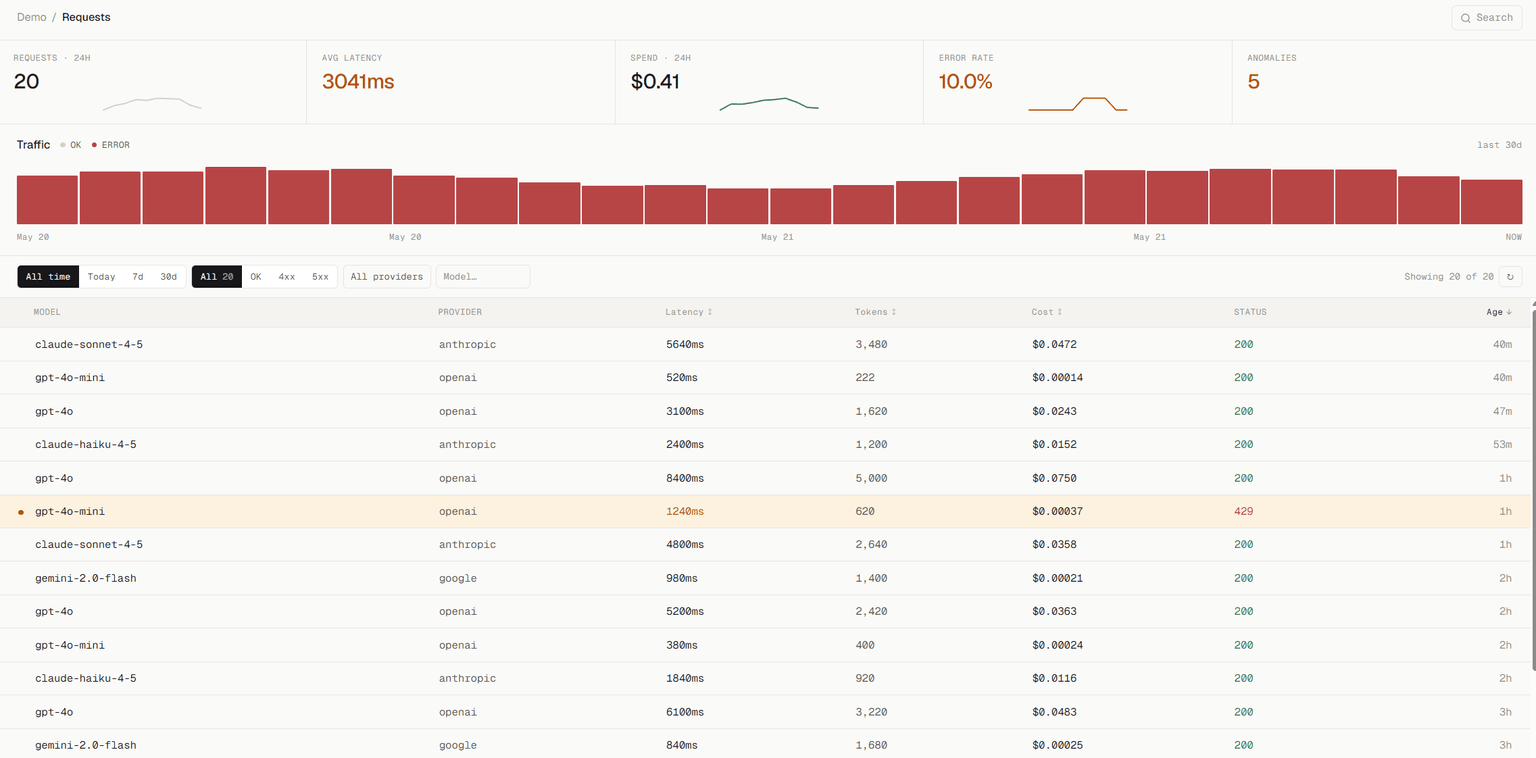
/requests page after the first call. Filter by model / status, click any row for the full body + traces.What about /traces?
The proxy setup above populates /requests only, so /traceswill be empty. That's expected.
Traces require explicit instrumentation: wrap your async functions with observe() from the SDK so Spanlens can group related LLM calls into a tree. Without that wrapper, each call is logged as an independent request with no parent trace.
See the SDK reference to add tracing in a few lines, or jump straight to how traces work if you want to understand the model first.
Troubleshooting
Request not showing up in /requests
- Confirm
SPANLENS_API_KEYis set in both.env.localAND your deployment environment - After adding env vars in Vercel, redeploy, because new values don't apply retroactively
- Check the Network tab. Your request should hit
api.spanlens.io/proxy/*, notapi.openai.comdirectly
400 “No active provider key registered for this Spanlens key”
You called a provider you haven't registered yet. Open /projects, find the Spanlens key, and click + Add provider key. Pick the matching provider (OpenAI / Anthropic / Gemini) and paste your AI key.
401 “Incorrect API key”
Either SPANLENS_API_KEYis missing in the runtime, or you're still constructing the upstream client directly (new OpenAI(...)) and passing the wrong baseURL. The simplest fix is to use the SDK helper: createOpenAI() sets both apiKey and baseURL for you.
Next: SDK reference for agent tracing and advanced usage, or direct proxy for non-Node environments.